
©2026, technoventure, inc.
ϕ Looping Control
Programming languages become much more powerful when they can expand the usefulness of the code that you write. One of the most basic ways for doing this is Looping Control. C and Pascal represent the next level of advancement over Fortran and BASIC in that they support Control Structures. These syntactical devices use key words to control what blocks of statements execute under different circumstances. Before control structures, programmers had to use conditionals and goto statements to redirect program flow. This kind of programming has been called Spaghetti Code for good reason. Control structures are implemented using special key words that identify the logic to be used and the syntax that implements it. This is usually followed by a conditional (enclosed with parentheses) and then a statement or group of statements enclosed with curly braces.
While C and ϕPPL do support the goto statement, most source code is better expressed using control structures. I find that C's use of Curly Braces (‘{’ and ‘}’) to set off blocks of statements to be much less intrusive than Pascal's “BEGIN” and “END”. It seems there are several other programming languages that need those key words. I don't like them because they tend to clutter the code. ϕPPL takes after C and uses Curly Braces.
ϕPPL departs from C significantly in this area as looping control is more modular. Instead of choosing among a number of monolithic options, you build control structures with the precise functionality you need. The flow chart below provides an overview of a looping control structure. Note that a break can happen within any of the (colored) statement blocks (called clauses) as well as a goto clause statement which is not shown to keep the chart from becoming too busy:
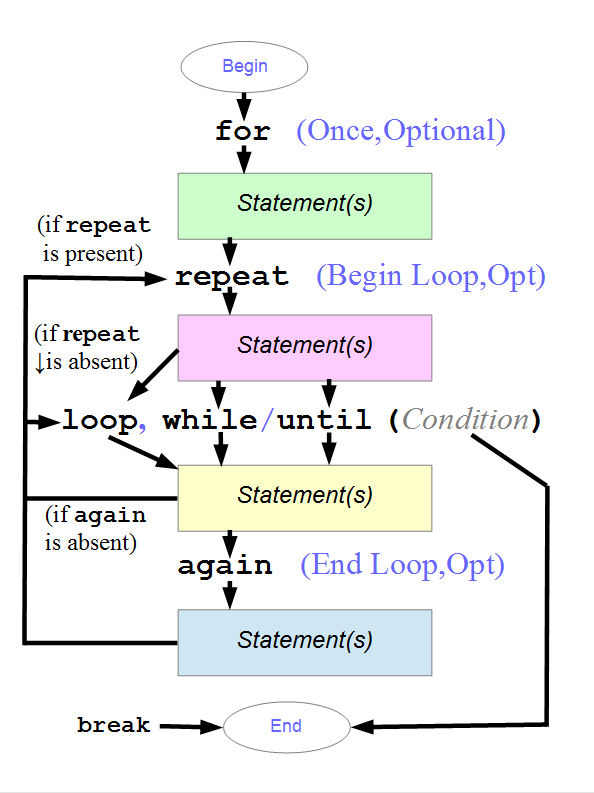
Modular Control Structures
Many other programming languages inherited the control structures of C with little to no improvement. ϕPPL uses a concept that is unique in the programming language world. It allows you to build looping control structures modularly. You first start with a Base Loop using one of the three key words loop, while or until. You can then prepend or append any of the optional Auxiliary Clauses to modify how it behaves. These are designated with the key words for, repeat and again. You can only have one Base Loop in any one control structure. You can add up to one of each of the optional auxiliary clauses.
| Key Word | Type | Conditional | Description |
|---|---|---|---|
| loop | Base | No | Infinite Loop |
| while | Base | Yes | Exit if FALSE |
| until | Base | Yes | Exit if TRUE |
| for | Aux | No | Execute Once |
| repeat | Aux | No | Begin Loop |
| again | Aux | No | End Loop |
The presence of a looping control structure implies the creation of a local scope when entering it and its destruction upon exiting it. All clauses belonging to the same loop share the same scope regardless of whether they have single statements or groups of statements attached to them. Space is allocated for all of the definitions in all of the clauses upon entry to the control structure simultaneously and they are all deallocated together. A local definition may happen anywhere within the scope and its initialization is simply viewed as an assignment at the place of the definition. Access to these local definitions can happen anywhere within the scope (i.e. within any one of its clauses). For example, if you define a variable named π and it is assigned the value of “3.14159” in its definition, storage for its value is allocated immediately upon entry into the control structure along with all the others. Its storage order among the other locals is not guaranteed as the compiler may sort them for optimal alignment on the stack. Its value may be over-written if it is a variable. But if it is a constant an assignment is only allowed where it has been defined. The definitions can be anywhere within the looping structure. References to them are not limited to positions following their definitions.
Base Loop
Begin building your loop using one of the Base Loop clauses. The key word loop has no conditional following it and is equivalent to “while (1)” in C. It eliminates both a needless test and the need to optimize out the test. If you build around a loop construct then you need to make sure the processor can exit the loop if that ever needs to happen. There are a very few cases where you might want an infinite loop with no way to exit. Some embedded systems use them to run interpreters or some other process that makes everything happen that needs to happen during run time. The loop might run inside the main entry function until power goes away.
Most loops require a way to exit and those will generally use either the key word while or until. That is followed by a conditional enclosed within parentheses ‘(’ and ‘)’. The conditional is followed by a statement or group of statements enclosed within curly braces. If the key word is while then program execution will stay in the loop if the expression evaluates to TRUE. If it evaluates to FALSE then the loop is exited. If the key word is until then the logic is reversed. The execution path only stays inside the loop when the expression evaluates to FALSE and exits when it is TRUE.
Just like in C, execution can exit the loop at any time with a break statement. This closes the scope and forces execution to what follows the control structure. Another way is to use the key word goto paired with a label that must be defined inside the current function. C has a way to cause execution to go back to the beginning of the loop using the key word continue. In ϕPPL we don't need this key word. Since we potentially have four clauses, there are more than one place where we might want to alter program flow. Here we use the key word goto followed by the clause's key word. Normally, a for clause is only executed once. But using this technique you can even cause it to run again as many times as you want.
The “do..while” control structure in C is not needed in ϕPPL. In fact it is a bit misleading because the semicolon that comes after the conditional implies a null statement. If you replace the null statement with a statement or group of statements you will get a compilation error. That control structure falls short of what adding a repeat clause to a base loop accomplishes.
for Clause
A for clause in ϕPPL begins with the key word followed by a statement or group of statements. If present, it must be the first clause in the whole control structure. It will be associated with a Base Loop which must be present. The statement or group of statements is normally executed only once. Its main function is to create the control structure's scope within which you can define zero or more local datums (i.e. variables and constants) along with their initialization.
repeat Clause
A repeat
clause in ϕPPL begins with the key word followed by a
statement or group of statements. It must precede a Base
Loop with which it will be associated. The statement or
group of statements is normally executed once at the beginning
of every loop. This is done before the conditional of the Base
Loop. It shares the scope with all of the other clauses
in the control structure. Adding a repeat
clause to a control structure basically turns a while loop
into a do..while loop without losing the option of putting a
statement or group of statements after the while's
conditional. And remember that you can still reverse the
conditional logic by following it with an until clause instead.
again Clause
The again clause expands the function of the third operation that appears in C's for control structure. It begins with the key word again followed by a statement or group of statements. It can be placed either before or after the Base Clause for convenience but it is always executed at the end of a loop that does not exit via a break, goto or the result of a conditional in the Base Clause. The ability to add multiple statements and even definitions to an again clause should eliminate the code cramming that is often experienced in C programs.
break
The break statement can be used to cleanly exit a looping control structure within any of its clauses. It is a statement in itself and must be followed by a semicolon ‘;’.
goto clause or label
A goto
statement can be used in two ways. Its main purpose is to
force program execution to a place within a function where a
label is located (See the section on labels here). It can also be
used much the same way as continue
in C to begin the next loop. Because ϕPPL uses a modular
control structure, this key word would be ambiguous since
there are potentially more ways to continue execution than
there are within a monolithic control structure. Instead, the
key word goto is followed by
the key word of the target clause. You can even goto the for
clause and make it execute again. So the choices are goto for,
goto repeat, goto again and one of goto (loop, while or
until).
Examples provided by Google
Complete Set of Four Examples1. Multi-Statement Setup & Update (
for + while + again):for {
ud : i ⇐ 0;
ud : j ⇐ max - 1;
}
while (i < j) {
arr[i] ⇔ arr[j];
}
again {
i++;
j--;
}
repeat + while):
for {
nb : byte_val; ♩ Shared across repeat, while, and
loop body
}
repeat {
byte_val ⇐ read_byte();
}
while (byte_val ≠ ⊙) {
process(byte_val);
}
3. Reversing Exit Logic (repeat
+ until):
for {
ub : attempts ⇐ 0;
bo : ready ⇐ 0;
}
repeat {
ready ⇐ check_hardware_status();
attempts++;
}
until (ready = 1 || attempts ≥ 5) {
wait_ms(100); ♩
Runs only if the until condition is still FALSE
}
4. Clause-Targeted Flow Control (goto <clause>):
for {
uq : idx ⇐ 0;
}
while (idx < count) {
er : status ⇐ validate(@data[idx]);
if (status < 0) {
reset_buffer();
goto
for; ♩ Re-initializes
idx ⇐ 0 and restarts from the top
}
if (status = 0) {
goto again; ♩ No change / skip processing, still
increments idx
}
process(@data[idx]);
}
again {
idx++;
}